System.in is an InputStream which is typically connected to keyboard input of console programs. System.in is not used as often since data is commonly passed to a command line Java application via command line arguments, or configuration files. In applications with GUI the input to the application is given via the GUI.
At times you might need to read console input provided by the user from the keyboard. The System.in field permits you to read input from the keyboard. The input can be converted into a stream of characters and then buffered so that all characters up to but not including the Enter key can be presented to the program.
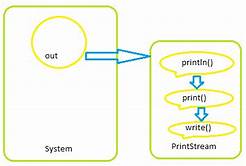
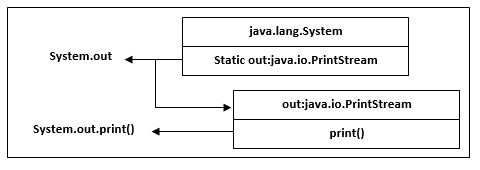
System.out.println is a Java statement that prints the argument passed, into the System.out which is generally stdout. System – is a final class in java.lang package. out – is a static member field of System class and is of type PrintStream. println – is a method of PrintStream class.
Scanner is a class in java.util package used for obtaining the input of the primitive types like int, double, etc. and strings. It is the easiest way to read input in a Java program, though not very efficient if you want an input method for scenarios where time is a constraint like in competitive programming.
• To create an object of Scanner class, we usually pass the predefined object System.in, which represents the standard input stream. We may pass an object of class File if we want to read input from a file.
• To read numerical values of a certain data type XYZ, the function to use is nextXYZ(). For example, to read a value of type short, we can use nextShort()
• To read strings, we use nextLine().
• To read a single character, we use next().charAt(0). next() function returns the next token/word in the input as a string and charAt(0) function returns the first character in that string.
References:
Stack Overflow
http://www.webucator.com
javapapers
geeksforgeeks

