while loop and scanner class

Today we gonna see the while loop condition and scanner class details in this portion.

i make a condition to get the result when count <=5 continuely increment by to condition made false .

1.Intitially count is zero

2.when my count is less than or equal to 5

2.1.get mark

2.2.increment count by 1

2.3.go back to step 2.

3.stop

in the above case we need to give input mark to the jdk, while the program running,

so we add the Scanner (class) to the program, the scanner is another class file previously programmed by someone to get the input while the program running , so we don’t need to create new one to get the input while the program running. all we have to do just copy the class (Scanner) , that means import java.util.Scanner to the program.it add below the package.

package selva.day1;

import java.util.Scanner;

public class FebTest1 {
public static void main(String[] args) {
int count=0;
while(count<=5)
{
System.out.println(“entermarks”);
count=count+1;

Scanner sc= new
int mark=sc.nextInt();
}
}

}

result:

entermarks

1

Entermarks

2

Entermarks

3

Entermarks

4

Entermarks

5

Entermarks

6


java programming

lets programming and enjoy, here below i write some simple programs.

example:1

The below program we assign the variable and their type first. Then, we assign the values.

package selva.day1;

public class Calculation {

public static void main(String[] args) {

int tamil;

tamil=80;

int english;

english=90;

int total=tamil+english;

System.out.println(“total”);

}

}

result:

170

example:2

In this program we assign the variables on a single line using commas, then we assign the values.

package selva.day1;

public class Calculation {

public static void main(String[] args) {

int tamil,english;

tamil=80;

english=90;

int total=tamil+english;

System.out.println(total);

}

}

result:

170

example:3

In this program we perform it directly.

package selva.day1;

public class Calculation {

public static void main(String[] args) {

int tamil=80;

int english=90;

int total=tamil+english;

System.out.println(total);

}

}

result:

170

example:4

In this program we perform type change like float, character and see the results.

package selva.day1;

public class Calculation {

public static void main(String[] args) {

int tamil;

tamil=80;

int english;

english=90;

float total=tamil+english;

System.out.println(total);

}

}

result:

170.0

package selva.day1;

public class Calculation {

public static void main(String[] args) {

int tamil;

tamil=80;

int english;

english=90;

char total=tamil+english;

System.out.println(total);

}

}

result:

Exception in thread “main” java.lang.Error: Unresolved compilation problem:

Type mismatch: cannot convert from int to char

at selva.day1.Calculation.main(Calculation.java:7)

example:5

In this program we need to find the average.

package selva.day1;

public class Calculation {

public static void main(String[] args) {

int tamil=80;

int english=90;

int total=tamil+english;

System.out.println(total);

int avg= total/2;

System.out.println(avg);

}

}

result:

170

85

example:6

In this program we perform the if,else operations and see the result.

package selva.day1;

public class Calculation {

public static void main(String[] args) {

int tamil=80;

int english=90;

int total=tamil+english;

System.out.println(total);

int avg= total/2;

System.out.println(avg);

if(avg>70) {

System.out.println(“A”);

}

else {

System.out.println(“B”);

}

}

}

result:

170

85

A

example:7

In this program we perform the nestif,else operations and see the result.

package selva.day1;

public class Calculation {

public static void main(String[] args) {

int tamil=80;

int english=90;

int total=tamil+english;

System.out.println(total);

int avg= total/2;

System.out.println(avg);

if(avg>70) {

System.out.println(“A”);

if (avg>80) {

System.out.println(“C”);

}

}

else {

System.out.println(“B”);

}

}

}

result:

170

85

A

C

example:8

In this program we perform the comparison operation and see the result.

package selva.day1;

public class Calculation {

public static void main(String[] args) {

int tamil=80;

int english=90;

int total=tamil+english;

System.out.println(total);

int avg= total/2;

System.out.println(avg);

if(avg<=90) {

System.out.println(“A”);

if (avg==85) {

System.out.println(“C”);

}

}

else {

System.out.println(“B”);

}

}

}

result:

170

85

A

C
example:9

In this program we perform the comparison operation and see the result.

package selva.day1;

public class Calculation {

public static void main(String[] args) {

int tamil=80;

int english=90;

int total=tamil+english;

System.out.println(total);

int avg= total/2;

System.out.println(avg);

if(avg!=90) {

System.out.println(“A”);

if (avg==85) {

System.out.println(“C”);

}

}

else {

System.out.println(“B”);

}

}

}

result:

170

85

A

C
hello world

here our first program hello world, to write this program we need to get in eclipse and it starts with eclipse ide asks Eclipse IDE uses the workspace directory to store its preferences and development artifacts.

it shows workspace: /home/your name/eclipse-workspace

we open the in the order like project–>package –>class

its nothing like windows file creation,

Drive–>folder–>file

now we start to write “hell world”. The eclipse perform like a word editor ,it helps the programmer to write a program in a simple manner and gives information bit by bit we type the program and give the correction like typing assistant. simultaneously compilation run in background and process the result. before we start to write program first we understand that java is case sensitive.

public class MyClass{

public static void main(String[] args){

System.out.println(“Hello World”);

}

}

in above MyClass is a class name and it should be follw below rules.

it should be meaningful , it shouldn’t be a verb ,there in no space between the letters, the first letter must be capital letter, first letter should not be a number, the class must be camel case example:- MyFirstProgram

public is a Java keyword which declares a member’s access as public. Public members are visible to all other classes. This means that any other class can access a public field or method. Further, other classes can modify public fields unless the field is declared as final.

public class classname

  • A static method belongs to the class rather than object of a class.
  • A static method invoked without the need for creating an instance of a class.
  • static method can access static data member and can change the value of it.
  • A static method can be accessed just using the name of a class dot static name …
  • If you want to use non-static fields of a class, you must use a non-static method.
  • static :- data stored only once it doesnt meant constant

void is a return type in java. It signifies that a method returns nothing, as implied by its literal meaning. For example, we write: public static void main(String args[]) It shows that return type of the function called ‘main’ has the return type void, hence it cannot return any number or string.

main is method that perform the operation in to the paranthesis {}

method{

method body or method definition

}

method definition: it is used to perform the operation on the content in between the brackets, we give it to perform required action.

system.out.println(“Hello World”)

it print the (content) in output display.here the println is like main method, but it used to print the data in between the bracket to output display.

in future blogs we see the operators,maths operations, and so on. thank for reading.

reference sites:www.stackoverflow.com

How to install eclipse for java

Eclipse (@ www.eclipse.org) is an open-source Integrated Development Environment (IDE) supported by IBM. Eclipse is popular for Java application development (Java SE and Java EE) and Android apps. It also supports C/C++, PHP, Python, Perl, and other web project developments via extensible plug-ins. Eclipse is cross-platform and runs under Windows, Linux and macOS.

Writing your First Java Program in Eclipse

Step 0: Launch Eclipse
  1. Launch Eclipse by running “eclipse.exe” from the Eclipse installed directory.
  2. Choose an appropriate directory for your workspace, i.e., where you would like to save your files (e.g., c:\myProject\eclipse for Windows) ⇒ Launch.
  3. If the “Welcome” screen shows up, close it by clicking the “close” button next to the “Welcome” title.
Step 1: Create a new Java Project

For each Java application, you need to create a project to keep all the source files, classes and relevant resources.

To create a new Java project:

  1. Choose “File” menu ⇒ “New” ⇒ “Java project” (or “File” ⇒ “New” ⇒ “Project” ⇒ “Java project”).
  2. The “New Java Project” dialog pops up.
    1. In “Project name”, enter “FirstProject“.
    2. Check “Use default location”.
    3. In “JRE”, select “Use default JRE (currently ‘JDK11.0.x’)”. But make sure that your JDK is 1.8 and above.
    4. In “Project Layout”, check “Use project folder as root for sources and class files”.Push “Finish” button.
  3. In “Create module-info.java” dialog, Click “Don’t Create”. (Note: For easier version of Eclipse, you need to use the “Next” Button in the previous step, and uncheck “Create module-info.java file”).
Step 2: Write a Hello-world Java Program
  1. In the “Package Explorer” (left pane) ⇒ Right-click on “FirstProject” (or use the “File” menu) ⇒ New ⇒ Class.
  2. The “New Java Class” dialog pops up.
    1. In “Source folder”, keep the “FirstProject”.
    2. In “Package”, delete the content if it is not empty.
    3. In “Name”, enter “Hello“.
    4. Check “public static void main(String[] args)“.
    5. Don’t change the rest.Push “Finish” button.
  3. The source file “Hello.java” opens on the editor panel (the center pane). Enter the following codes:public class Hello { public static void main(String[] args) { System.out.println(“Hello, world!”); } }
Step 3: Compile & Execute the Java Program
  1. There is no need to compile the Java source file in Eclipse explicitly. It is because Eclipse performs the so-called incremental compilation, i.e., the Java statement is compiled as and when it is entered.
  2. To run the program, right-click anywhere on the source file “Hello.java” (or choose “Run” menu) ⇒ Run As ⇒ Java Application.
  3. The output “Hello, world!” appears on the Console panel (the bottom pane).
NOTES:
  • You should create a NEW Java project for EACH of your Java application.
  • Nonetheless, Eclipse allows you to keep more than one programs in a project, which is handy for writing toy programs (such as your tutorial exercises). To run a particular program, open and right-click on the source file ⇒ Run As ⇒ Java Application.
  • Clicking the “Run” button (with a “Play” icon) runs the recently-run program (based on the previous configuration). Try clicking on the “down-arrow” besides the “Run” button.
  • references:www3.ntu.edu.sg

Non primitive datatype

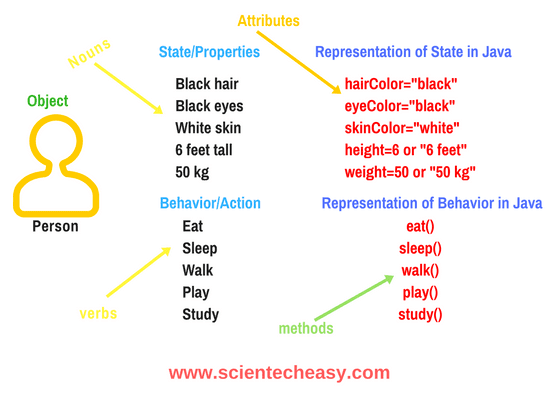
Non primitive data types simply said user defined datatype, because primitive datatype already assigned values. ex : int, float are have predefined size and range values. but, non primitive is a class (template or blueprint) it has object.                

The non primitive datatype  (class) have objects. The object represent class. Object is a combination of state and behaviour. In detail, class is a template (phone) and it contain object (like display ,RAM , camera etc).

In this case we have some confusion between class and object, because phone is a object(real time entity). why we said it’s a class. The reason is we decide the phone is a class while write a program and it contain objects like RAM, CAMERA, SPEAKER,MIC ETC. For instead RAM has state (mega pixels) and behaviour ( photo , video)

Variable: it represent primitive data type it contain only values, new keyword is not needed , size is fixed.

Object: it represent class.it can contain values and behaviours. New keyword is needed for allocating memory. Size is not fixed(dynamic).

Ex: class name: car ,reference name engine, new (allocate memory for object creation),

car engine=new car(); car gear= new car(); car steering= new car();

Class  have rules: meaningful name,shouldn’t not be verb. Should start with capital letter. No special characters allowed except underscore ‘_’ . shouldn’t start with numbers.no space is allowed. Should follow camel case .ex :ActivaBikeFromHonda

Ex: reference image from site http://www.scientecheasy.com

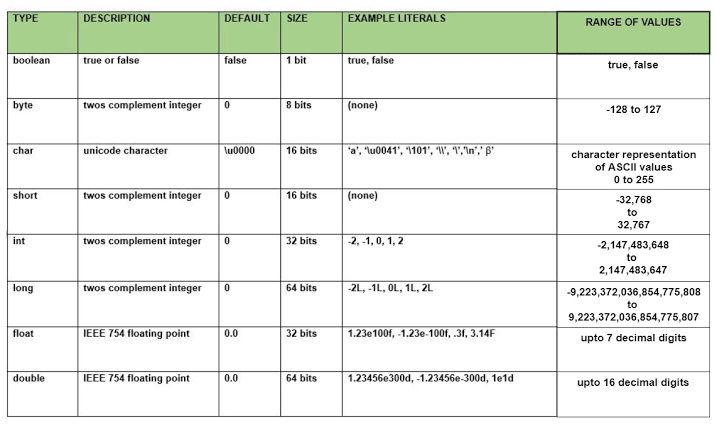
data types in java

Before we see the data types , to know the use and why its necessary.

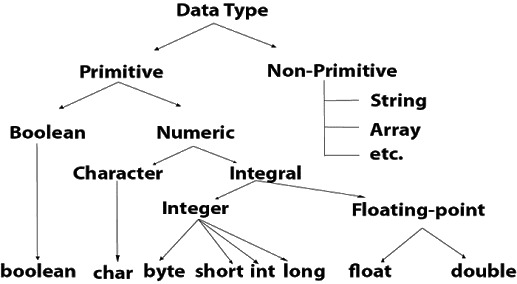
It helps to difine type of input while we write program, its sizes and ranges , because the computer system has limited efficient memory(intelligence) compare to human intelligence. So we need to define and instruct to perform the limited memory very efficiently by using this data types.  The datatype given below

The datatype has two major types 1.primitive datatype. 2.non primitive datatype

Primitive datatype                                  the primitive data type is primary keyword(reserved words in Java).

The above table clearly give some view of reservedwords usage
Continue reading “data types in java”

Start travel in java

This is my first post, I here to explain my learning experience

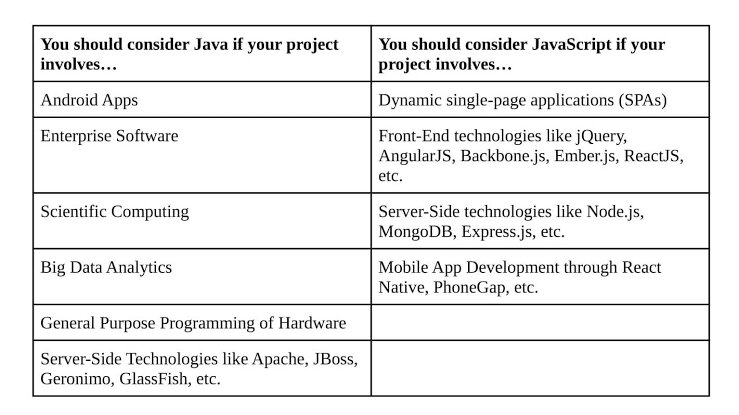
What is Java? Why we learn Java? some kind of questions arise in our my mind before we start to learn java.

The Java is the open source language and open source (the code is visible) is the safest one and it’s a freedom language (free language). It’s maintained by world wide developers community.

Java is developed by oops( object oriented programming structure) concept

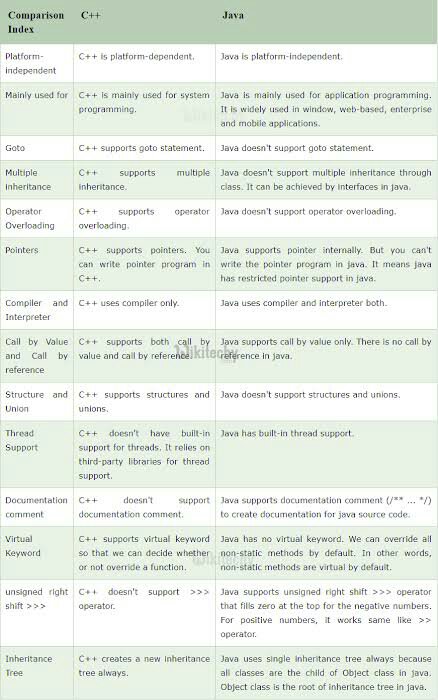
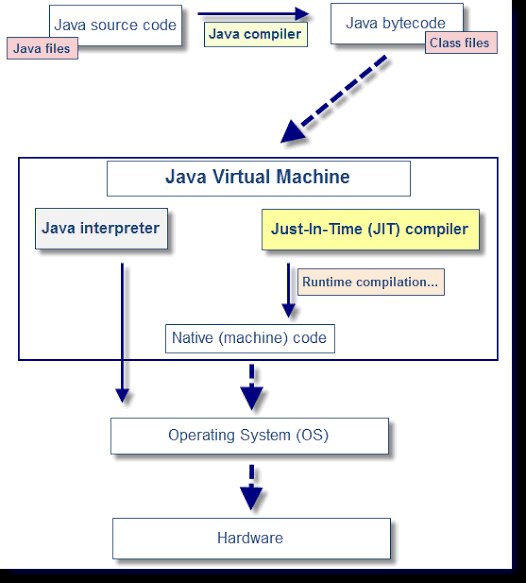
Java( has compiler with interpreter structure)

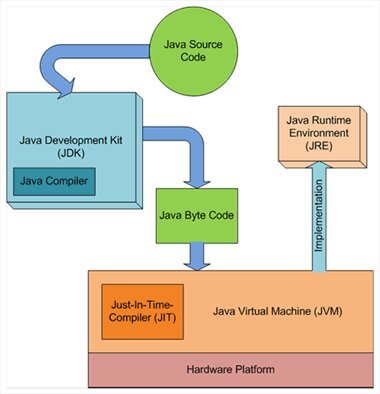
Java development kit

Java virtual machine

Java running environment

Just in timer

Note: The reason to call Java to open source , it is platform independent

Here the platform is os( operating system) and hardware.

Java has compiler and interpreter

1.compiler

It is used translate bunch of code into machine code at a time

2.interpreter

It translate every code to machine code one by one

Jdk

It is the tool to run the program. It has compiler, exception handling, garbage collector.

once the compilation complete the machine code move to processor, after processing we got output.

It converts source code into Java byte (encrypted format ) .class file

JVM

It is used to reduce running time while different OS and hardware system can run same program

The JVM has its own compiler.

It helps the group of different platform systems can the program and it includes just in time compiler.

Java runtime environment is take the Java code compile them and use some set set of libraries to run the program.

Introduce Yourself (Example Post)

This is an example post, originally published as part of Blogging University. Enroll in one of our ten programs, and start your blog right.

You’re going to publish a post today. Don’t worry about how your blog looks. Don’t worry if you haven’t given it a name yet, or you’re feeling overwhelmed. Just click the “New Post” button, and tell us why you’re here.

Why do this?

  • Because it gives new readers context. What are you about? Why should they read your blog?
  • Because it will help you focus you own ideas about your blog and what you’d like to do with it.

The post can be short or long, a personal intro to your life or a bloggy mission statement, a manifesto for the future or a simple outline of your the types of things you hope to publish.

To help you get started, here are a few questions:

  • Why are you blogging publicly, rather than keeping a personal journal?
  • What topics do you think you’ll write about?
  • Who would you love to connect with via your blog?
  • If you blog successfully throughout the next year, what would you hope to have accomplished?

You’re not locked into any of this; one of the wonderful things about blogs is how they constantly evolve as we learn, grow, and interact with one another — but it’s good to know where and why you started, and articulating your goals may just give you a few other post ideas.

Can’t think how to get started? Just write the first thing that pops into your head. Anne Lamott, author of a book on writing we love, says that you need to give yourself permission to write a “crappy first draft”. Anne makes a great point — just start writing, and worry about editing it later.

When you’re ready to publish, give your post three to five tags that describe your blog’s focus — writing, photography, fiction, parenting, food, cars, movies, sports, whatever. These tags will help others who care about your topics find you in the Reader. Make sure one of the tags is “zerotohero,” so other new bloggers can find you, too.

Design a site like this with WordPress.com
Get started